
What Do SMS Bell Colors Mean?
Bell icons appear in several places in Zr Ware™.
Links
Some bells, like in reports or on the client screen, are always blue, and they provide a link to the text conversation in Podium. Following the link will allow you to text the customer.

Status Report
Unlike linking bells, colored bells indicate the status of the most recent Confirmation Text Message that has been sent to the customer for a specific booking.
- Gray means that no confirmation text has been sent for this booking.
- Blue means that a confirmation text has been sent for this booking.
- Green means that the customer followed the confirmation link, and the booking was successfully confirmed. Note that this will not necessarily mean that the booking is confirmed. It is possible that the booking was confirmed via text, but then changed afterward. The bell will continue to show green, even though the booking is not confirmed for the current time.
- Red means there was an error sending the text for some reason. If this happens, try resending the message. If it still continues to fail, it is possible that the phone number for the client is not a valid phone number. After you have validated the phone number, if it still fails, please reach out to corporate.
Note here for Blue bells, “sent” means that Zr Ware™ was successfully able to deliver the message to Podium. Podium may or may not then send the message to the customer. For example, if a phone number is invalid, Zr Ware™ will send the message to Podium, and Podium will attempt to send the message. If the message fails to send because the number isn’t valid, then Podium doesn’t let Zr Ware™ know what happened.
Therefore, it is possible for messages to appear as if they sent, but didn’t actually make it to the customer.
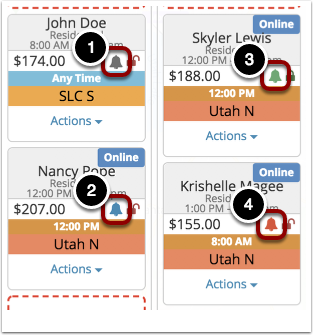
Colored bells appear in several places on the Map View, like below.

Comments
0 comments
Please sign in to leave a comment.