
Standard Sync
Process:
- Sync over all line items in Admin > Products & Services
- Sync over all clients that have a completed, revenue booking and we have not previously sent their information over.
- Sync over all invoices that have been closed that have not previously been sent over.
- Sync over all line items on invoices that have not been sent over since it was previously sent over.
- Sync over all payments.
Batch Sync
The purpose of the batch sync is to allow QBO to scale for large bases like Corporate over time.
Process:
- Looks at all completed, revenue bookings for the franchise that have not been sent over to Quickbooks.
- Syncs over Product Categories as QBO Products/Services where the name is [3 letter short code] - [Category Name].

- For each unique appointment date from the set of completed/revenue bookings it will:
- Create a client in QBO whose name is [year]-[month] based off of the appointment date.

- The invoice on that client represents a single day in the month. The invoice number will be [3 letter short code][4-digit-year][2-digit-month][2-digit-day].

- The line items on the QBO Invoice is the aggregate of all services based on their category.

- Create a client in QBO whose name is [year]-[month] based off of the appointment date.
- No payments are synced over, they are entered in manually referencing the Completed Jobs and/or Payments Received report.
Useful reports for bases using the Quickbooks Batch Invoicing:
What do I do if I need to adjust an invoice that has already been included in the Batch Sync?
You don’t need to reopen the invoice.
Because all of the revenue from all the invoices on a given day are grouped together by their product category, it's a little trickier to keep the data between Zr Ware® and QBO in sync. Once a line item has been included in the batch sync, we currently can’t modify that same line items price and modify the QBO invoice. For example, consider this use case where I’m adding a service to an invoice that has a % off promo code. I may see an error message like this:
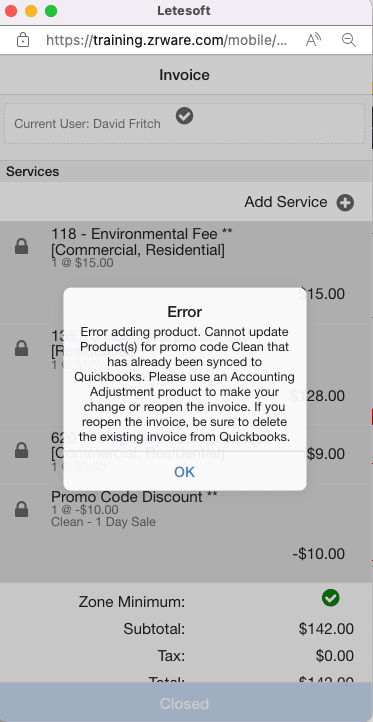
In several of the bases in Zr Ware®'s Products & Services there has been an Accounting Adjustment item created where the Product Code is “Accounting Adjustment”. This will allow you to add new line items to an existing invoice without having any promo codes on that invoice recompute the promo codes. If you add the Accounting Adjustment line item on there, you shouldn't run into this error. Now, the next time the batch sync runs, it will modify the existing invoice in QBO by appending an equivalent line item to the QBO invoice.

What happens with a refund?
- If you issue a refund, you will need to enter that refund in manually into QBO.
What to do if a System Admin reopens an invoice in a Batch QBO setup:
- System admin will clear out the secondary_qb_id on both the work_product, invoice, and payment entities.
- Then from Client Details > History > Actions you can reopen the booking (assuming fresh page load).
- Finance Admin will have to journal entry/manually correct the invoice in QBO to offset the data that had gone over but has now been reversed.
Comments
0 comments
Please sign in to leave a comment.