
Capacities
Capacities appear on the Map View, Booking Screen, and Admin → Capacities.
The goal for revenue and the number of jobs are set in Admin → Booking & Scheduling.
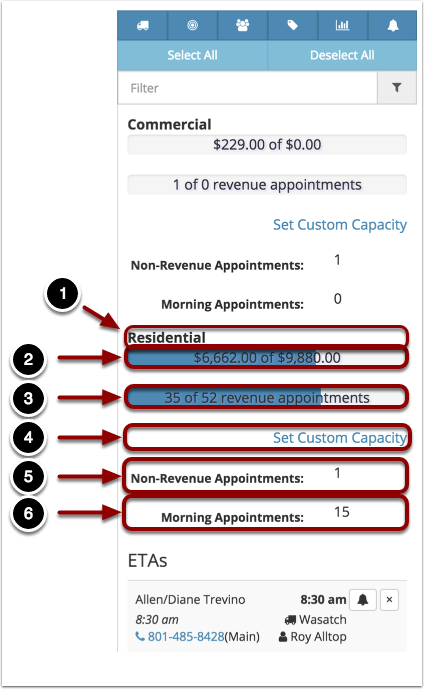
The image below is from the Map View. The format is slightly different in each location, but the content is the same.
- This is the name of the Department. The numbers below it all belong to the Department it is under.
- This show the Revenue Capacity for the day. The first number is the sum of the dollar amounts for all bookings for the day. The second number is the goal for the day.
- This is the capacity for the number of jobs for the day. The first number is the number of jobs for the day. The second number is the goal for the number of jobs for the day.
- This is where you can set a custom capacity for the day (only on the Map View). Please see the chapter on How do I manually set the daily capacities?
- This is the number of Non-Revenue Appointments for this day (not in Admin → Capacities).
- This is the number of Morning Appointments for the day (not in Admin → Capacities).
Comments
0 comments
Please sign in to leave a comment.